
9 Grocery Budgeting Apps That Are Actually Useful
If you've been feeling like everything is more expensive lately, it isn't just in your imagination. Prices are on the rise everywhere, and one of the biggest expenses hitting consumers' wallets is groceries. According to NerdWallet, food prices are 34.6% higher than they were in 2019 thanks to a combination of factors, like higher production costs, supply chain issues, and tariffs. In an effort to cut back, many people are trying new ways of planning their grocery shopping, and employing tricks, like our 20 grocery shopping hacks to save money. One of the strategies folks are seeking out is using grocery budgeting apps.
A quick search for "grocery budget" in Google Play or the App Store renders dozens of possible solutions to your grocery budgeting conundrum, but they aren't all created equal. That can be a good thing since everyone's budgeting needs are a little different. But, it's exhausting to filter through the options to figure out what actually works for you. So we did a bit of that research for you and found nine apps that are actually worth your time. From meal planning and general spending tracking to real-time, item level tracking during your shopping trip, the ingredients for your perfect grocery budgeting app are all here.
Mealime
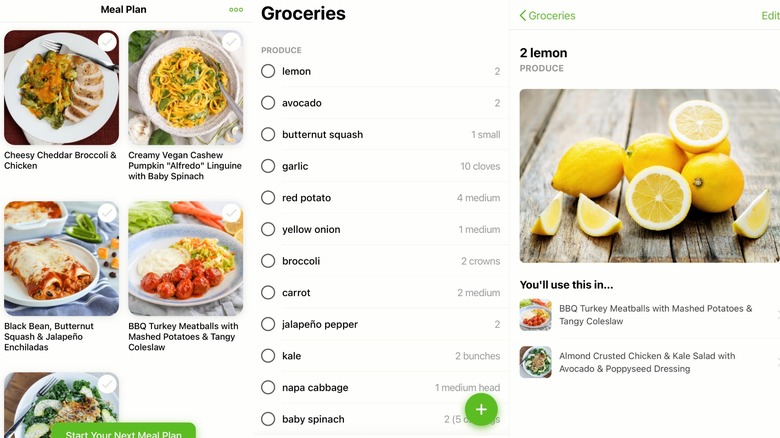
Food waste has a huge impact on your wallet. You may not even realize how much money you're throwing away each week in leftover, unused ingredients, like that quarter of an onion or half bag of spinach in your produce drawer. Creating a meal plan can help you save money by showing you the exact quantities you need to buy for the week, and few apps do it better than Mealime.
In the Mealime app, you can select all your meals for the week from its database of recipes. There is even a "budget friendly" recipe section with meals that add about $3 per serving to your grocery bill. Once you create your weekly meal plan, the app combines the quantities of ingredients from all the meals into your grocery list so you only buy the amount you need. Once you're ready to shop, you can take the list to the store and mark everything off as you buy it, or use the app's built in "Shop Online" feature to select your favorite participating store. You can see prices, and, in some cases, even checkout for delivery or pickup.
When it's time to cook, you can easily access your meal plan for the week and follow each preparation step in the app. You'll need to upgrade to Pro for access to some of the recipes, but at $2.99 per month, it's cheaper than the food you've been throwing away.
GroceryBudget
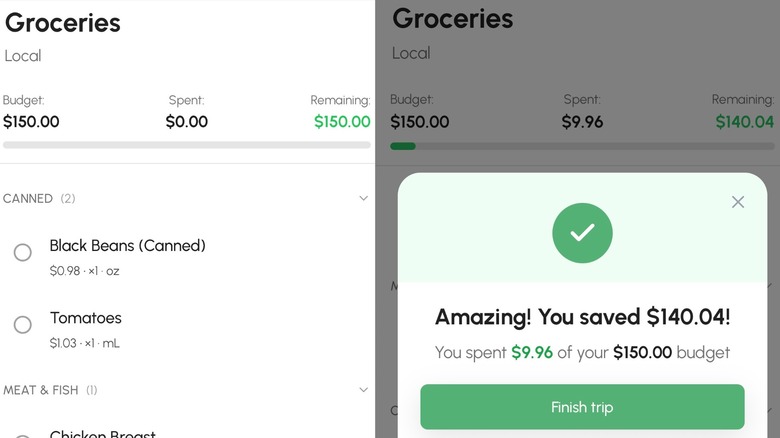
For some people, the issue isn't with food waste or figuring out what to eat, but losing track of how much they're actually spending as they add things to their cart in the store. If you fall in this category, try GroceryBudget while you shop.
Using artificial intelligence (AI), the premium version of GroceryBudget allows you to take a photo of an item's price while you shop so your running total is tracked. It also remembers past prices and breaks down your spending by store, so you can manage how dynamic pricing impacts your grocery bill. Instead of being at the mercy of ever changing prices, you can keep an eye on which items are going up in price, which are unexpectedly on sale, and which you'd be better off buying at another store altogether.
If you don't want to spring for the premium version at $3.99 per month, you can use the free version to manually make your shopping lists and budgets or add items by voice, but you aren't going to have access to insights into your shopping history. On the other hand, if the app revolutionizes your shopping, you can get a yearly subscription for $19.99 or go all-in on a lifetime subscription for $39.99.
Listonic
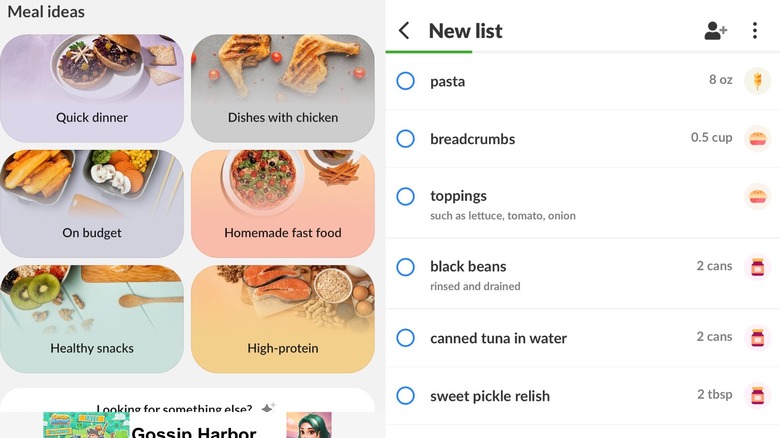
If you're a fan of using AI to scour the web for recipes and deals, Listonic combines a few different strategies for helping you plan meals and stay on a budget, all with the help of an AI assistant. You can input the type of meals you're looking for, whether it's a particular cuisine, a certain price per serving, or based around dietary restrictions, and Listonic will give you ideas and link you to recipes. From there, you can add the ingredients from any recipe to your shopping list.
Once you're ready to go shopping, add your local stores to the app to see their flyers and offers. You do have to add the prices of items as you go, but you'll be able to explore insights into your spending over time. Listonic also compiles food facts, nutrition information, and tips for choosing the best type of produce or cut of meat, or for how to best store the food on your list. You can also share lists with other people in your household and they update in real time.
The app does have a bit of a learning curve if you're not well versed in similar AI assistants, but once you figure out its format you can expand and collapse information to help keep your screen organized. But, be on the lookout for red flags that might indicate the recipes are AI generated rather than just AI aggregated, like vague instructions or confusing quantities.
Goodbudget
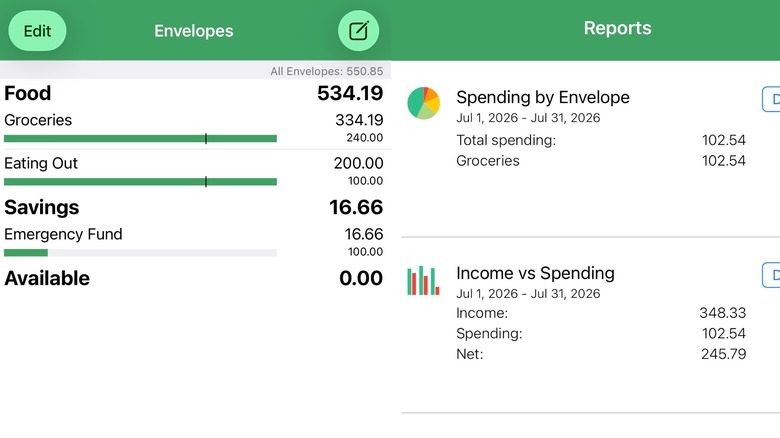
For people who like cash envelope style budgeting, Goodbudget takes the concept and makes it digital. For the uninitiated, envelope budgeting is a system where you put a certain amount of money in designated envelopes and once that money is gone, you have nothing left to spend on that expense. The Goodbudget app lets you create digital envelopes for how you'd like to budget your money. With the free version you need to deduct expenses as you shop, but with the premium version you can sync your accounts to pull the totals as you spend.
While it isn't solely for grocery budgeting, it's a great way to track your grocery expenses over time. You can even assign different grocery stores their own envelopes to track which stores you spend the most at. You'll also be able to sync your envelopes with other people in your household.
The premium version also gives you unlimited envelopes, unlimited bank accounts you can sync, seven years of transaction history, and up to five shared devices for household syncing. It is on the pricier side at $10 per month or $80 per year, but it has the potential to get all of your spending on track.
Groceries Tracker
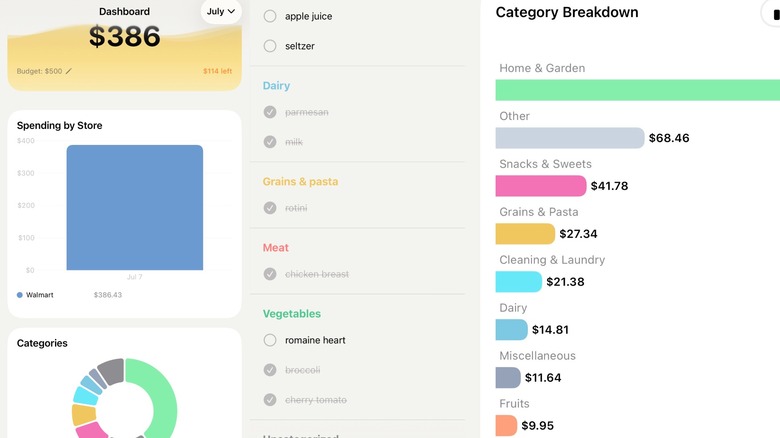
While knowing a total amount spent at a grocery store might be enough for some people's budgeting needs, others want to know which items or category of items are driving up their spending. For those people, there's Groceries Tracker.
With this app, you just scan your receipt with your phone's camera and the app will give you an item-level breakdown so you don't have to figure it out yourself. Groceries Tracker uses Microsoft Azure to read the text on your receipts, including store name, date, item names, and prices.
Like GroceryBudget, Groceries Tracker helps you keep an eye on prices over time so you can see if your favorites are getting more expensive. The app also lumps items into categories (suggested by OpenAI from your extracted receipt info) so you can see if you're spending more on a particular type of grocery purchase, like snacks or alcohol.
There's a free budget calculator built in to give you an idea where to start cutting back, and the app also allows you to separate your tracking by store so you can break up your shopping trip in the most budget-friendly way.
AnyList
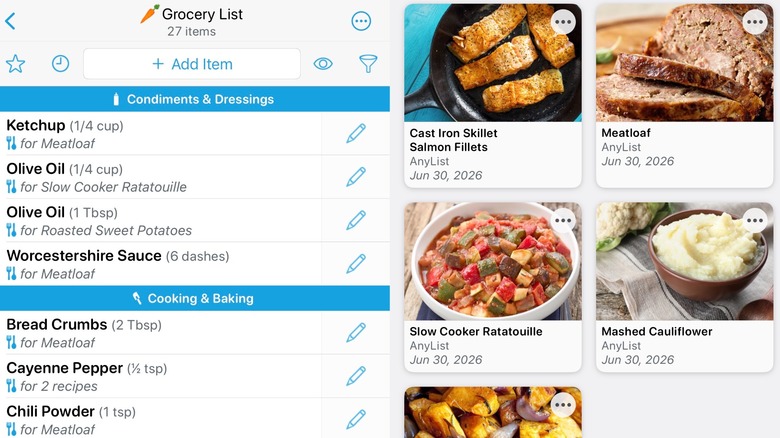
We know we said earlier that few apps do meal planning better than Mealime, but AnyList certainly gives it quite the run for its money (or maybe, your money). Just like Mealime, AnyList helps you cut down on food waste by creating a meal plan with recipes and then shopping directly from that meal plan. The import function lets you add recipes seamlessly from anywhere online, and, while Mealime lets you plan your meals for the week in a general way, AnyList gives you the option of adding them to specific days on the calendar.
If you're shopping for gifts (or anything else you don't want prying eyes to see) you can lock your lists with a passcode. Or, if you'd rather not use your phone at all, AnyList is even available on your Apple Watch.
By upgrading to AnyList Complete, you can also import your local stores to add items directly (linking their price at the same time), or you can populate prices manually to the items in your list. The app then tracks prices across stores and keeps a running tally of what you spent so far, ensuring you get the best deal on your shopping trip. AnyList Complete is $9.99 per year for an individual plan or $14.99 per year for a household plan, which allows you to sync lists (and split the shopping) with other people on your plan.
Flipp
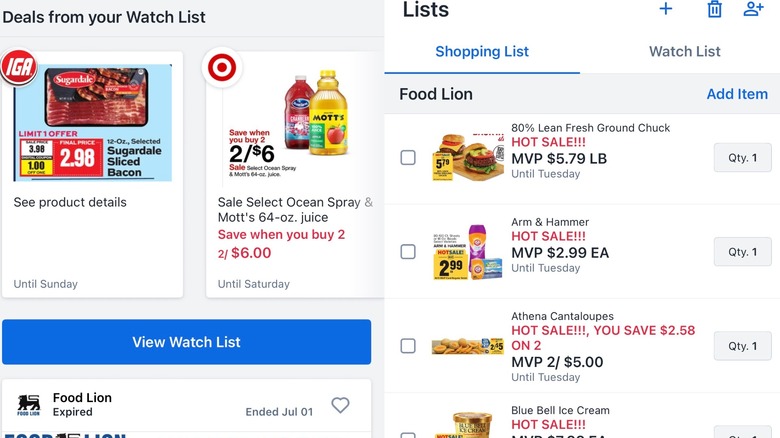
For those among us who prefer to shop the store circulars for the best deals, what if we told you there's an app that will aggregate digital circulars? That same app will tell you which of your local stores have an item from your grocery list on sale, and allow you to link your store loyalty cards and clip manufacturer coupons. That app is Flipp, and it's available on both mobile and desktop.
Add in your zip code (or turn on your location settings), and Flipp will search for nearby stores with digital circulars. From there, you can browse and click on items you want to add to your list. When you do, the items show up as circled in the digital circular as well as in list format under the heading for the selected grocery store. You can also set alerts for when certain items go on sale and Flipp will let you know when and where to get those items at the lowest prices, allowing you to stock up before you're totally out of something if there's a good deal.
While you could, feasibly, do all your shopping based on the circulars alone, especially since inflation is bringing back many old school groceries, you an also use Flipp to manually add items to your grocery list and clip store coupons using your digital rewards cards.
Total Plus: Shopping Calculator
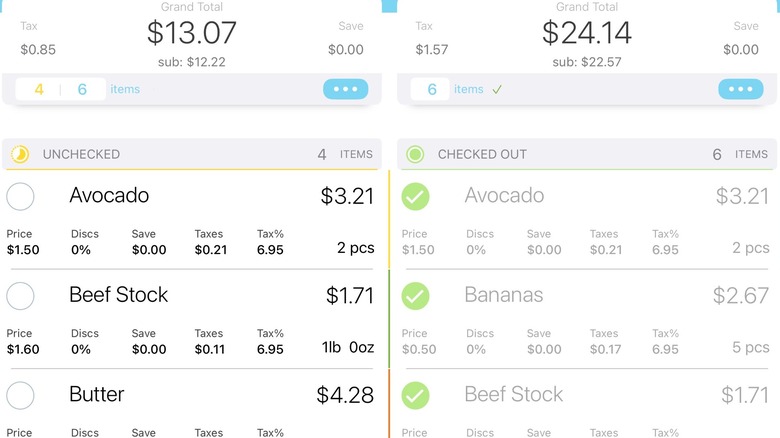
For those who want to be able to track real-time during shopping trips, but don't want to use AI automation, Total Plus: Shopping Calculator is much more than just a calculator. Yes, you'll need to add or confirm prices manually as you shop (which you may already be doing with your phone's built in calculator), but the app also allows you to track discounts and taxes. The pro version even allows you to edit the tax rate for specific items.
You can calculate your running grocery bill by tracking items by weight or quantity, adjust prices as you find items in the store, and categorize your list by item types, recipes, or whatever way makes the most sense to you. Once you finish your shopping trip, you can save your completed list in your cart as a receipt to keep track of how much you spent in total.
Although it isn't available for Android (yet), you can find it in the App Store with basic features available for free. For a one-time cost of $1.99, you can get all the app's essential features including unlimited lists, comments, tax rates, and coupons. For an additional $0.99 per year, you can add on Auto Tax Detection, which uses your location to detect the local tax rate if you're traveling.
Google Sheets
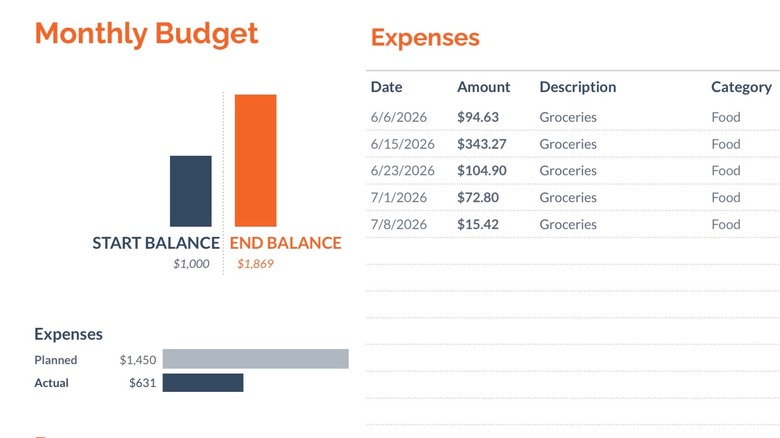
There's something to be said for an app as customizable as Google Sheets. The spreadsheet app lets you use formulas and filters to track your weekly, monthly, or annual totals, compare store prices to help you figure out if the most affordable grocery store in the U.S. is also the most affordable store near you, track your payment methods, set spending goals, keep things organized with color coding and filters, automate saving and spending calculators, and adjust everything if and when your needs change.
If you're comfortable with spreadsheets and formulas, you can build it all from scratch with the exact information you're looking to calculate. Or, if you're feeling a bit intimidated by doing it yourself, there are a ton of free templates online that allow you to do virtually anything you need. You can even customize the general Google Sheets monthly budget template to track your groceries across different stores or categories and create tabs with recipes and ingredients that you can pull into a shopping list.
There is a lot of manual input required initially, but that also means you'll be incredibly well acquainted with your spending. The actual math is all automated with formulas after you put in your info and you can even create graphs and pivot tables with the info once you start feeling super comfortable. The best part is that it's totally free.